


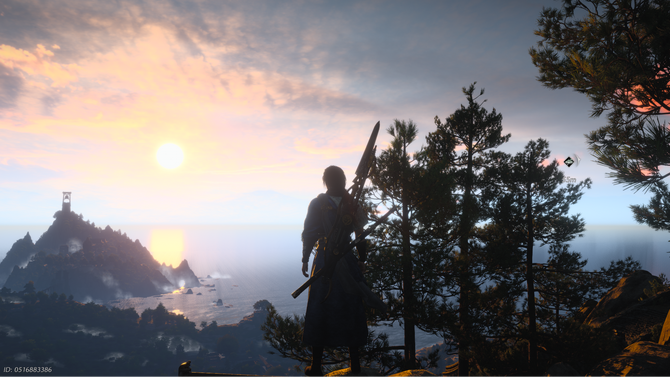
Set in 10th-century China, *The Legend of Feng Yan: Where Winds Meet* features combat using everything from swords and spears to umbrellas and fans as weapons. Developed by Everstone Studio and published by NetEase Games, it is a free-to-play wuxia open-world action RPG.Players take on the role of a young swordsman, traveling from the tranquil Qinghe River to bustling cities.
In this article, we’ll share our performance test results using a pre-release build provided by NVIDIA, in conjunction with the game’s upcoming support for DLSS 5.
The PC configuration used for testing is as follows:
CPU: AMD Ryzen 9 9950X
Memory: Micron DDR5-5600 128GB (4 x 32GB modules) *1
Motherboard: ASUS TUF Gaming B850-PLUS WIFI
Display: ROG Strix XG32UQ (3840×2160 / up to 160Hz) *2*3
GPU: NVIDIA GeForce RTX 5090 32GB
*1 The memory is operating at a frequency lower than DDR5-5600.
*2 The display is not overclocked; it is set to a fixed 144Hz with G-SYNC enabled.
*3 The display’s HDR setting uses ASUS Gaming HDR mode.

For testing, we used NVIDIA’s graphics driver (version 621.24) that supports DLSS 5 for this game.
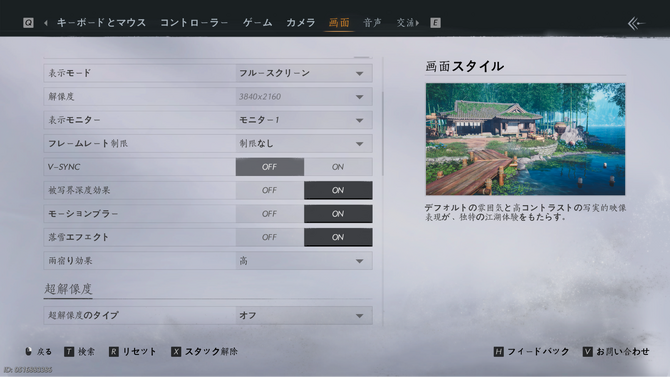 | 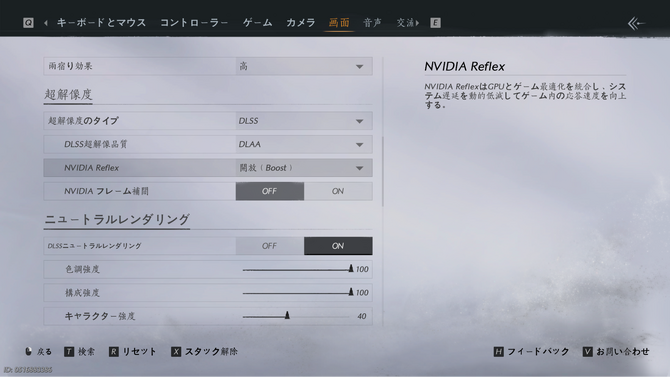 |
We switched the setting to “DLSS” and conducted tests by toggling “DLSS Neural Rendering” on and off. The output resolution was set to 4K, and when DLSS was enabled, “DLAA” was used for the quality setting. For comparison purposes, we also toggled HDR on and off via the brightness settings.
The Benefits of HDR—Even When It’s Too Intense
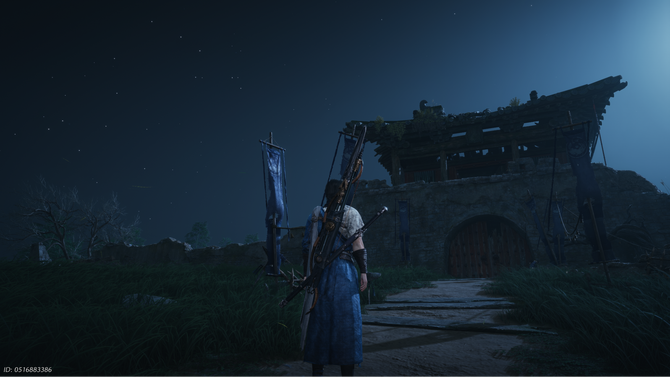
HDR (High Dynamic Range) technology, which expands the range of brightness and darkness, truly shines on compatible monitors. It can realistically depict the dazzling glow of twilight and reflections on water surfaces while clearly rendering even the intricate textures in shaded areas.
DLSS 5’s neural rendering is a technology that uses the game’s rendered image as a foundation and uses AI to render lighting and material textures in real time.NVIDIA’s documentation for this title cites examples such as the way the light from a flame softly spreads through candle wax, sunlight filtering through leaves, and the texture of an old stone monument’s surface.
When I actually switched between the two settings in the game, the first thing that caught my eye was the HDR effect. Whether it’s the golden hue of rock surfaces bathed in the setting sun or the reflections on the water’s surface, the impression changes so noticeably when HDR is turned on that it’s obvious at a glance.
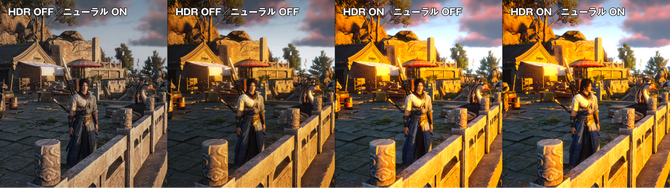
Let’s start with the square bathed in sunset light. When comparing the two images with HDR off, the screen with neural rendering enabled shows slightly subdued yellow tones on the stone railing in the foreground and the rock surface in the background.In the two images on the right, with HDR turned on, the golden hues of the setting sun on the rock face and the fabric of the food stalls are significantly more intense. When viewed side by side like this, the change caused by toggling HDR is immediately apparent—more so than the difference from Neural Rendering alone.

In the scene looking down at the water from a hilltop, pay attention to the sun in the sky and the reflections stretching across the water’s surface. In the image with HDR on, the orange of the clouds is deeper, and the contrast between the reflections on the water and the figures and pine trees—which appear dark due to backlighting—is more pronounced.The difference when switching neural rendering is less noticeable than in the square, and the two images with HDR set to the same setting have very similar backlit effects.
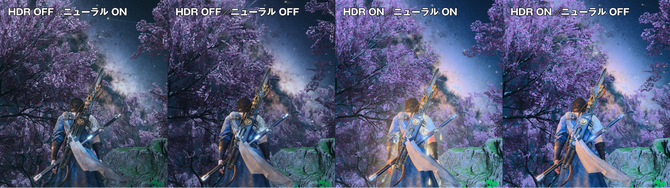
In the scene looking up at cherry blossoms at night, the difference in HDR was the first thing that caught my eye. With HDR turned on, the bluish-white band of the Milky Way stands out clearly against the night sky, and the purple of the blossoms and the green covering the rocks at my feet become much more vivid. Because the silhouettes of the dark branches remain, the illuminated blossoms stand out beautifully.
When I set the HDR settings to match and toggled Neural Rendering, I could see subtle differences in the hues of the blossoms and branches, but the overall impression of the night scene created by the starry sky and the blossoms remained very similar. Whether in sunset or night scenes, it was HDR that significantly altered the overall atmosphere of the screen.
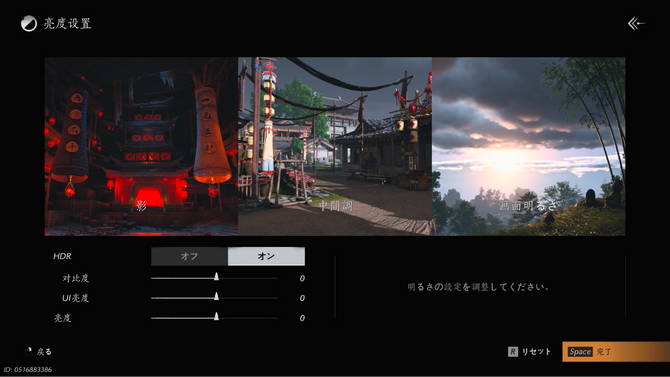
However, even among readers using HDR-compatible displays, some may feel that “turning it on just makes the screen look whitish and washed out.” While all such displays are broadly labeled as “HDR-compatible,” there is a significant difference in how they appear between models that merely receive the signal and those equipped with sufficient brightness and color gamut.
For this test, we used the “ROG Strix XG32UQ,” which supports DisplayHDR 600 and 96% DCI-P3. It’s important to note that displays lacking sufficient brightness and contrast cannot fully render the contrast between light and dark areas, which can actually make the image look dull.
What is the frame rate when using Neural Rendering?
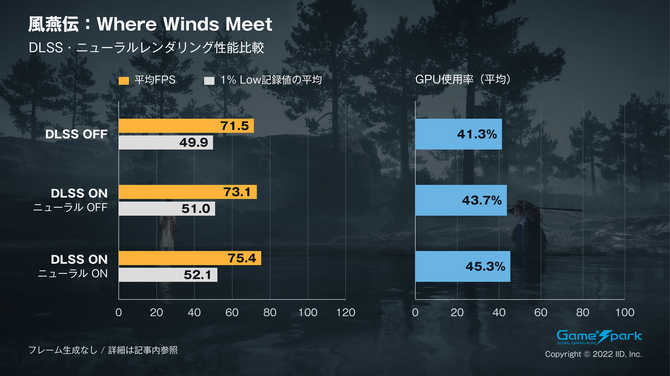
Here are the frame rate measurement results from actual gameplay. We compiled data under three conditions: DLSS off, DLSS on with Neural Rendering off, and DLSS on with Neural Rendering on.
This time, measurements were taken while moving through a crowded city, from the bridge in front of the palace to the city’s entrance. The video was recorded in an HDR environment with DLSS enabled.
With DLSS enabled and Neural Rendering turned on, the average frame rate increased from 73.1 FPS to 75.4 FPS, and the average 1% Low value rose from 51.0 FPS to 52.1 FPS.On the other hand, with DLSS disabled, the average frame rate was 71.5 FPS, and the average 1% Low value was 49.9 FPS.
Average GPU utilization was 43.7% with Neural Rendering off and 45.3% with it on, showing only a slight change here as well.Since the conditions—such as the number of pedestrians—were not consistent during these tests, we cannot definitively conclude that the differences in these figures are due to Neural Rendering; however, at least in this environment, we did not observe any tendency for the frame rate to drop significantly when the feature was enabled. It would be harder to find a reason not to use this feature in this game.
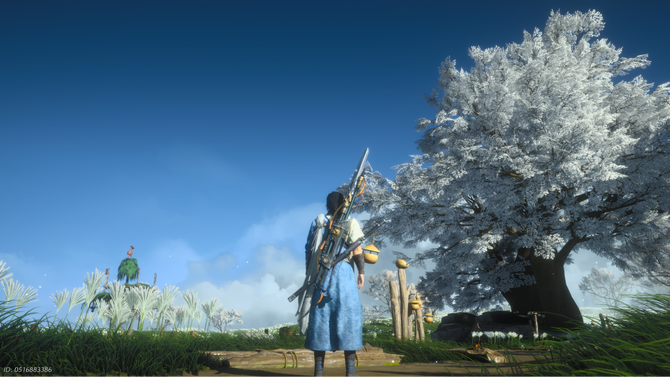
However, when comparing footage from various scenes, the effect of HDR alone was very strong, and the benefits of Neural Rendering in this game were more noticeable in environments where HDR was not enabled.
Through this testing, I found that DLSS 5’s Neural Rendering in this game is an exceptionally capable feature that enhances image quality while minimizing the increase in GPU load; the only drawback is that it is not available on anything other than the RTX 50 series.
If you already have a high-performance HDR setup, you can fully appreciate the visual beauty with HDR alone; however, for those playing in SDR environments or settings where HDR’s benefits are limited, it serves as a reliable option that takes immersion in the game’s world to the next level. Be sure to try it out and experience the difference between having it on and off, tailored to your own monitor setup.



