


The sky stretching out beyond the clouds, swarms of missiles soaring through the air, and the tension of the battlefield and the incessant sound of alarms transmitted over the radio. The official release of “Ace Combat 8” (hereinafter “AC8”), the latest entry in the series and a title celebrating its 30th anniversary, is just one day away.
This title utilizes Unreal Engine 5 and the proprietary “Cloudly” technology. While the game features impressive graphics—such as three-dimensional cloud rendering—one concern is likely the high recommended system requirements.

No matter how beautiful the graphics are, you can’t stay focused if the screen stutters while you’re chasing enemy aircraft. How high can you push the graphics quality, and what settings should you adjust if you prioritize smooth gameplay? In this article, we’ll use our standard PC equipped with an RTX 5090 to test how graphics settings affect both image quality and performance.
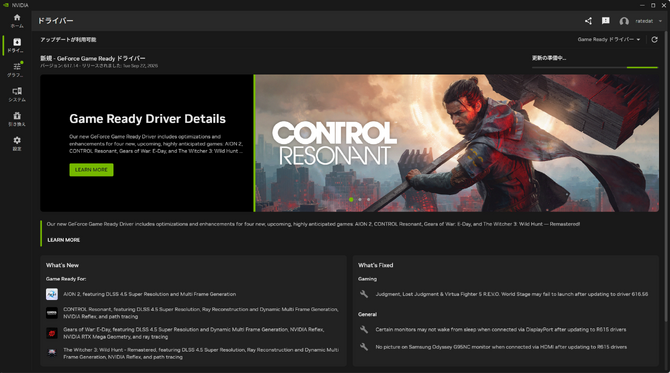
We’re conducting these tests using the latest graphics card driver available at the time of writing: version 617.14 (Game Ready driver).
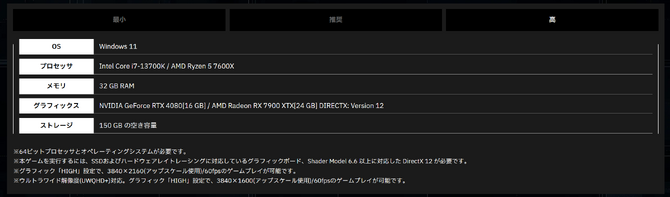
The recommended specs listed on Steam are a “GeForce RTX 3070 or Radeon RX 6800” with 32GB of RAM, but this is based on a target of 60 fps at 1920×1080 with upscaling enabled and “MEDIUM” settings.The recommended specs table on the official website for 4K/60 fps lists an RTX 4080 or higher, which is also quite demanding.
The PC specifications used for benchmarking are as follows:
CPU: AMD Ryzen 9 9950X
Memory: Micron DDR5-5600 128GB (4 x 32GB modules) *1
Motherboard: ASUS TUF Gaming B850-PLUS WIFI
Display: ROG Strix XG32UQ (4K UHD (3840 x 2160) @ 160Hz) *2
GPU: NVIDIA GeForce RTX 5090 32GB
*1 The frequency is slightly lower due to DDR5 specifications.
*2 Set to a fixed 144Hz without overclocking and using G-Sync.

For this test, we used replay playback to measure performance for the “Over the Rainband” mission at resolutions ranging from 4K to Full HD under identical conditions.Since frame generation is not currently supported in this game, we have created separate graphs for frame rates with and without DLSS, as well as for different preset settings (due to time constraints, we only measured DLAA/ULTRA/HIGH at 2K and Full HD resolutions).
Please note that the test results in this article are actual measurements taken on the author’s system. Results may vary depending on your PC configuration, drivers, and in-game conditions, so please use this information as a reference for adjusting your settings.
DLSS Settings That Feel a Bit Lacking

First, let’s see how much of a difference changing the presets makes. This game has four preset levels: ULTRA, HIGH, MEDIUM, and LOW. By default, the game uses TSR—an Unreal Engine-based upscaling method—rather than DLSS, so I switched to DLSS before adjusting the preset settings.

If frame rate isn’t a priority, the RTX 5090 exceeds 60 fps and delivers a stable frame rate. While high-refresh-rate displays exceeding 100 fps have become commonplace these days, stable performance is ultimately what matters most.We selected this mission for our testing because it features constant rain, dramatic movements of the sea of clouds, and detailed condensation effects on the canopy—all of which involve a high volume of fine particles and place a heavy load on the system.

At 4K resolution, the effect of lowering the preset was clearly evident: the average frame rate improved from 87.0 fps on ULTRA to 130.5 fps on LOW. On the other hand, while the average fps improved on HIGH, there was no significant change in the minimum frame rate observed during these tests.At MEDIUM and below, the minimum frame rates also improved, so lowering the settings to this level could be a viable option if you’re aiming for more stable performance.
On the other hand, the increase in average fps slows down at 2K and below.The difference between HIGH at 2K and HIGH at HD was only about 1.7%, and the results showed that, including LOW at 4K, the average frame rates clustered around 130 fps. While lowering the settings does have a positive effect, there is a tendency for frame rates to plateau once the resolution or preset is reduced beyond a certain point.

On the other hand, the game does not support NVIDIA Reflex or frame generation, which leaves it feeling slightly incomplete. Although methods for frame generation were discussed on forums, since this is a title that uses EasyAntiCheat, I couldn’t take the risk and decided not to test it in this round of measurements.
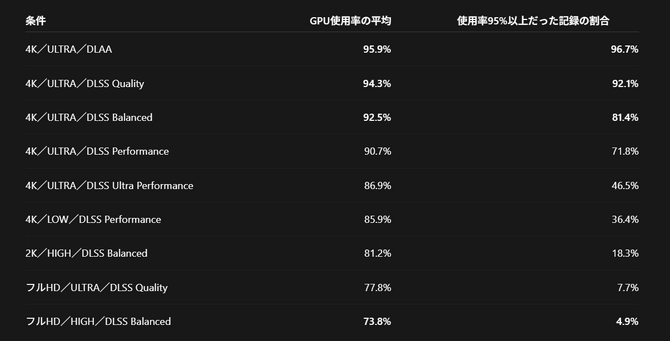
Additionally, GPU utilization remained extremely high during the benchmarks, staying near the upper limit for extended periods.At 4K with Ultra and Balanced settings, VRAM usage reached approximately 16GB, and the GPU utilization remained above 95% for about 81% of the total test time. Even the RTX 5090 was pushed to its limits in many scenes, indicating that this is a GPU-intensive title in a 4K environment.
How Much Will the Graphics Change?

Now that we’ve reviewed the numbers, let’s compare the actual on-screen visuals.
When comparing the aircraft itself, the differences between the presets aren’t that significant. The “203” markings, panel seams, and fine details on the landing gear are all preserved. On the other hand, there are significant differences in texture detail and lighting.Perhaps because the 3D models themselves are well-rendered, the visuals remain quite impressive even when the graphics settings are lowered. This title is no exception; since it focuses primarily on fighter jets, the aircraft themselves look quite stunning even at lower settings.

Let’s take a look at some other scenes. This is the opening scene from the opening sequence. While there are differences in details such as fine water droplets and skin textures, it’s impressive that the cutscenes still look beautiful even on low settings. Between ULTRA and HIGH, the fine texture and shading of the clouds are relatively well preserved, and there isn’t a major difference in the overall impression.
However, differences become apparent in fine details, such as water droplets on the surface of a boat. The differences become more noticeable starting at the “MEDIUM” setting.If you look at the clouds spreading from the top-left corner toward the center of the screen, you’ll notice that their outlines and internal shading are blurred, and the fine undulations aren’t as noticeable as they are on ULTRA or HIGH. Since the characters’ appearances don’t change significantly, the difference is easiest to spot by focusing on the clouds in the background.
At the LOW setting, pay attention to the shadow cast on the bottom of the boat. Compared to higher settings, the boundary between light and shadow appears harder and more angular. Even when the setting is lowered, the overall atmosphere of the scene remains, but there are gradual differences in the detail of the sky and the softness of the shadows.

Finally, let’s wrap up this article by looking at the frame rates for each DLSS setting.
The effects of DLSS are most evident at 4K. While DLAA averaged 64.2 fps, the frame rate improved to 87.0 fps on “Quality” and 124.3 fps on “Ultra Performance.” Even without frame generation, the average fps has been significantly boosted.
However, the minimum frame rate is a cause for concern. When switching from “Quality” to “Balanced” and then to “Performance,” the average fps increases as expected, but the minimum values actually decrease. While “Performance” reached an average of 104.1 fps, the minimum frame rate remained at a level close to that of DLAA.These results show that higher average fps settings do not necessarily lead to improvements in the lower end of the frame rate spectrum.
Additionally, at 2K and HD resolutions, the increase in average fps from DLSS is smaller; the difference between DLAA and the “Quality” setting at HD was approximately 4.8%. While there is some improvement in the minimum frame rate, the effect of changing settings is limited when the goal is to further increase the average fps.
However, given that frame generation is not officially supported at this time, judging by the 4K results on the RTX 5090, it may be extremely difficult to achieve over 100 FPS at 4K on other graphics cards.
To enjoy both beautiful skies and smooth aerial combat

Looking back at the benchmark results for various graphics settings in a 4K environment on the RTX 5090, the most impressive finding from this test was that even when the graphics preset was lowered to “LOW,” the quality of the fighter jet models and event scenes did not degrade significantly, and the visuals remained exceptionally beautiful.

On the other hand, even with the RTX 5090, GPU utilization nearly reached its limit at 4K/ULTRA, and the average FPS did not reach 100.Since the game does not currently support frame generation, adjusting the presets and DLSS settings is crucial if you’re aiming for a high frame rate. If smooth gameplay is your priority, it’s likely effective to first lower the settings to “MEDIUM” or below to boost the minimum frame rate.
Since you’re playing, you’ll want to enjoy not only the enemy aircraft right in front of you but also the scenery stretching out beyond them. Find a setting that works for you and take to the skies.
*Ace Combat 8* is scheduled for release on October 2, 2026, forPlayStation 5, XBOX Series X|S, and PC (Steam).



